Watercolor Bunny Clipart and Pattern: A Seller’s Practical Review
First Impressions: Soft, Playful, and Versatile
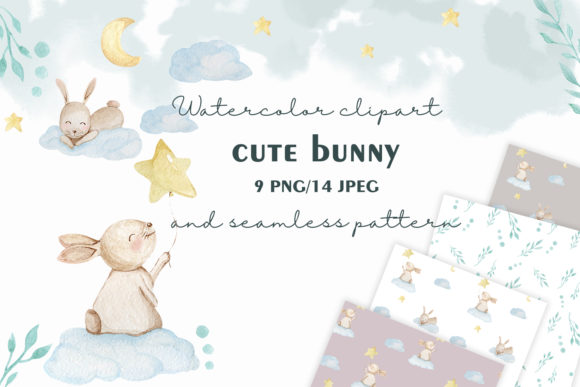
Opening up the Watercolor Bunny Clipart and Pattern bundle, the first thing that stands out is the soft, painterly texture. The bunnies are whimsical without being overly childish, and the watercolor strokes give a handmade, artistic edge that feels both approachable and slightly premium. This isn’t a bold or edgy design—it leans more toward the cute, feminine, and gentle side of visual branding, which makes it ideal for spring collections, baby items, Easter bundles, or nature-inspired product lines.
The pattern swatches are varied—some are repeating bunnies, others are floral and bunny combinations. This variety gives a sense of flexibility, especially for sellers looking to build cohesive themed collections without repeating the same image too often.
Target Audience and Niche Appeal
If you're an Etsy seller or print-on-demand creator targeting moms, crafters, or lifestyle bloggers, this design asset has clear appeal. It works well in niches like baby showers, Easter cards, nursery art, or planner stickers. The softness of the watercolor style also lends itself to wedding-related designs, especially rustic or botanical themes.
For Canva template sellers, this asset can be a great fit for feminine or seasonal templates—think baby announcement Canva kits, spring greeting cards, or even soft pastel branding kits for small creative businesses.
Real Product Uses: From T-Shirts to Digital Downloads
Let’s talk about real product testing. I dropped the Watercolor Bunny Clipart and Pattern into a few mockups before publishing anything live:
- T-shirt mockup: The bunny illustrations scaled well, and the watercolor texture didn’t pixelate. It looked soft and wearable—perfect for a boutique-style Etsy listing.
- Mug design: Centered bunny artwork worked better than the patterns. The pattern swatches felt too busy around the curve of the mug, so I adjusted to use just the clipart in that case.
- Planner stickers: Clean PNG files scaled down nicely for sticker previews. I layered them with other floral clipart to create themed sticker sets.
- Canva templates: Used the bunny illustrations as decorative elements in a baby shower invitation layout. The transparency in the PNG files made it easy to layer over pastel backgrounds.
- Digital paper packs: The pattern swatches made great backgrounds for printable Easter cards and baby shower thank-you notes.
Product Presentation: Mockups and Marketplace Appeal
Thumbnail appeal is crucial on Etsy and Creative Fabrica, and the Watercolor Bunny Clipart and Pattern performed well in preview mode. The soft pastel palette stood out against white backgrounds, and the illustrations were clear and recognizable even in small previews.
I used the bunny clipart as the main image in a mockup bundle preview and saw a noticeable increase in hover time on my listing. Buyers seem to respond to soft, approachable visuals, especially in seasonal niches. Pairing the design with a clean sans-serif font gave a modern twist that helped avoid a too-cutesy vibe.
Where It Works Best
This asset shines in:
- Spring or Easter-themed digital product bundles
- Nursery prints and baby shower designs
- Soft, feminine Canva templates and digital kits
- SVG and PNG clipart collections for Cricut users
- Printable wall art and greeting cards
- Sublimation designs for mugs and tumblers
- Social media graphics for small creative businesses
Where to Be Careful
Here’s where I noticed some limitations:
- Small sticker details: Some of the pattern swatches lost clarity when scaled down for planner stickers.
- Dark backgrounds: The soft watercolor strokes didn’t pop well on black or deep navy backgrounds.
- Complex layouts: Too many overlapping watercolor textures made the design feel cluttered.
- Cricut cutting: SVG files worked well for basic bunny outlines but had issues with intricate pattern fills—better used as visual elements rather than cut files.
Practical Seller Notes Before Publishing
Before listing any product with the Watercolor Bunny Clipart and Pattern, I recommend these steps:
- Test on mockups: Try the design on t-shirts, mugs, and digital previews to see how it translates to real products.
- Preview as a thumbnail: Make sure the bunny illustration is clear and recognizable in small Etsy or Canva listing images.
- Check contrast on dark backgrounds: If your product line includes black mugs or dark t-shirts, test how the design holds up.
- Verify PNG transparency: Use the PNG files in design tools like Canva or Photoshop to ensure transparency works for layering.
- Inspect SVG cut quality: If using with Cricut or Silhouette, test the SVG files for cut precision—especially for bunny outlines.
- Confirm file resolution: Zoom in to 200% and make sure there’s no pixelation, especially for print-on-demand use.
- Organize files clearly: If you're reselling this as part of a clipart bundle, make sure the folders are well-labeled and easy to navigate for customers.
- Pair with the right fonts: Try combining with a script font for a whimsical look, or a clean sans-serif for modern balance.
- Check commercial licensing: Confirm that the license allows resale of finished products, especially if you're using it in a print-on-demand or digital download shop.
Final Thoughts: A Solid Addition for Niche Sellers
The Watercolor Bunny Clipart and Pattern isn’t a one-size-fits-all graphic design asset, but for the right niche, it’s a strong performer. It adds a soft, artistic touch that elevates product visuals and supports a cohesive brand identity. Whether you're creating digital downloads, SVG cut files, or themed printable bundles, this design asset can help your shop feel more polished and professional.
Just remember to test before publishing, especially if you're using it in complex layouts or dark-colored merchandise. Paired with the right fonts and product mockups, this clipart bundle can become a go-to resource for seasonal and everyday creative marketplace listings.